
Upon successful purchase, customers receive an immediate email confirmation containing an electronic PDF ticket with a unique bar code. Custom branded PDF tickets let you use your own logo and add your purchase and refund policies. Of course, you can disable the PDF ticket from any event such as when customers prefer to get their tickets at Will Call. And you're not limited to electronic PDF ticket printing -- read on below to learn about our thermal ticket printing options.
Electronic PDF Ticket Printing with Advertising Space
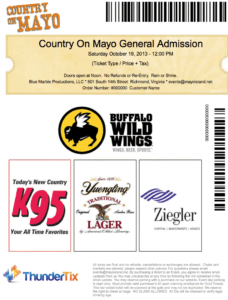
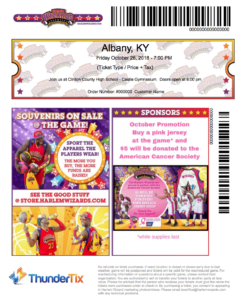
Each electronic ticket includes a special graphics area. Use this to sell sponsorships to area restaurants with redeemable offers that let restaurants know that advertising with you works! Consider creating your own event coupons with limited-time offers to motivate sales, and include custom graphics of your choice.
- Use a smartly designed event picture to create a "Souvenir Ticket" that builds memories
- Boost sales for slow-selling events with coupon offers and specials
- Build partnerships with local area vendors and offer coupons to their businesses–and vice versa!
- Add revenue for your venue with advertising space for area sponsors
- Promote upcoming events and build anticipation (one of the 3 elements of the shared experience)
 |
 |
 |
Fraud Detection: Barcode Ticket
Confidence in your event ticketing is ensured with uniquely identified barcodes and the ability to scan customers in as they arrive. Choose from multiple scanning options. Download our free barcode ticket scanner app for both iOS and Android devices. Or just log in and use our barcode scanning software built right into your account. As patrons arrive with their electronic PDF tickets, the scanned tickets are marked with the staff member performing the scan and a time stamp. Previously scanned tickets are immediately flagged to prevent unauthorized entry.
As a final option, we both sell and rent handheld scanner equipment. The rugged design of our handheld scanners withstand drops and other abuses and only needs a USB connection to another Internet-connected device. They also perform well in poor lighting conditions.
Event Guest List
The guest list is accessible at any time as an on-screen list and also as an export. Venues can cross-check the guest list with a valid ID at the door or verify identity with the address, phone, and/or the last 4 digits of the credit card used in the case that the customer doesn't have a proper ID. You can reprint electronic PDF tickets or thermal tickets directly from the screen for quickly sending people through the doors.
Thermal Ticket Printing
In addition to electronic pdf ticket printing, ThunderTix offers thermal ticket printing on-demand as tickets are processed in the box office. Use a thermal printer, like a Boca Lemur, to quickly print hard tickets. Using custom ticket stock allows you to create souvenir-style tickets.
Thermal ticket printing is optional and requires a thermal ticket printer and ticket stock. Thermal ticket printers are not inexpensive and often much more than most small, volunteer-run organizations actually need. The electronic PDF ticket printing option is a great way to get started at little to no cost with the ability to upgrade and add a thermal printer down the road.