
Every confirmation email is a marketing opportunity
ThunderTix follows every purchase with a branded, customizable ticket confirmation email, complete with the buyer's tickets, your logo and colors, and up to three upcoming shows to promote. It reinforces your brand and drives the next sale, automatically.
Show exactly what you want, and nothing you don't
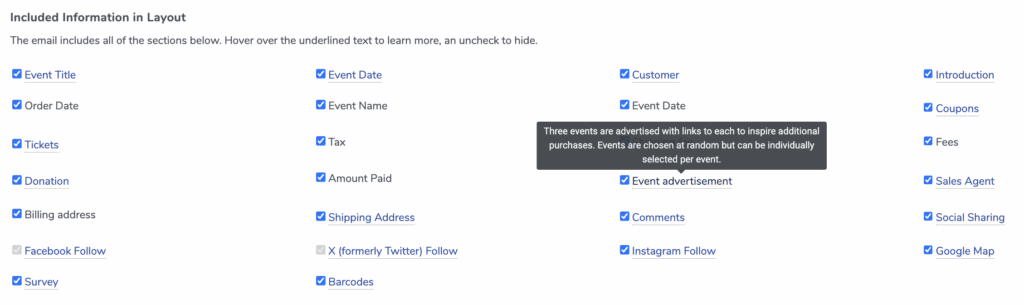
Every organization communicates differently. With a simple checkbox layout editor, you choose precisely which details appear in your confirmation emails. Set it once, and it applies across every event automatically.
- Toggle sections on or off: event title, date, fees, donations, social sharing, sales agent, and more.
- Highlight parking details but hide the sales agent? Include donation info but hide billing addresses? Just a checkbox away.
- Field layout is one standard template for every event, while your top-and-bottom messages are custom per event, campaign, or gift card.
Turn every receipt into your next sale
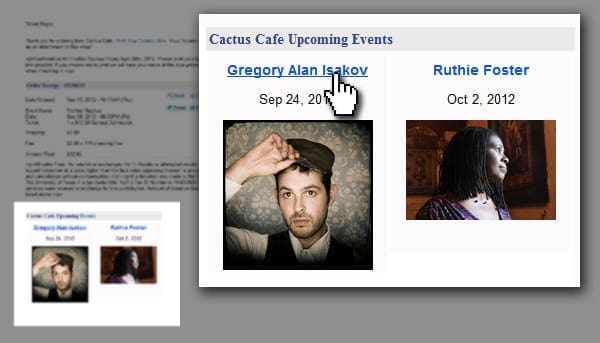
Capture excitement at the exact moment customers are most engaged. Each receipt can automatically feature up to three upcoming shows, with images and direct purchase links, so a single order becomes an invitation to the next one.
- Feature up to three events with images and one-click purchase links.
- Show random picks, or hand-select events by genre, style, or audience.
- A jazz buyer sees other jazz shows, nudging incremental sales with zero extra effort.
Turn every buyer into a promoter
Right after checkout, a friendly prompt invites customers to share their purchase to Facebook or X. Each share carries a direct link to the exact event and performance, making it effortless for friends to grab seats at the same show, often from entirely new audiences.
- On X: a pre-written, editable post with a direct link to that performance.
- On Facebook: a share window with the event details already filled in.
- Learn more about social sharing tools.
Events are more fun with friends
Share your tickets to A Christmas Carol
Know every ticket actually arrived
Never wonder whether a customer got their tickets. ThunderTix shows detailed delivery statistics for every receipt, so you can fix problems fast and keep patrons happy before they reach the door.
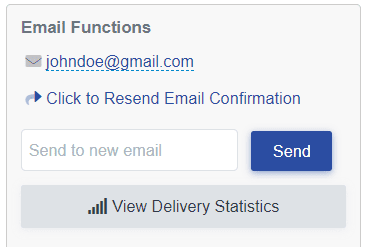
- See when a receipt is delivered, opened, clicked, bounced, or marked as spam.
- Resend confirmations in a click, or let customers resend their own.
- Optional email validation (via a third-party service) catches typos like @gmial.com before the order is processed.
- A bounced-email report flags orders that did not reach the inbox, so you can follow up and make sure every ticket is delivered.
Everything included in every confirmation
One automated email that carries the tickets, reinforces your brand, and reaches the inbox reliably.
Personalized messaging
Event date, time, and a Google Map link, plus a custom message at the top and bottom of the receipt, set per event, campaign, or gift card.
Digital tickets included
Each receipt can include print-at-home PDF tickets as a link and attachment with an embedded QR code. eTickets are on by default and can be toggled off per event.
Apple & Google Wallet
Patrons add tickets to Apple Wallet or Google Wallet for easy, contactless retrieval on the day of the event.
Email validation
Optional email validation, powered by a third-party service, catches typos at checkout before the order is processed.
Set-and-forget templates
Configure your confirmation once and it is applied automatically across all of your events.
Branded to match you
Your logo, colors, and personalized messages on every confirmation email, so your brand stays front and center.
Receipts are the most-opened email you'll ever send
Confirmation emails get opened far more than any newsletter. With ThunderTix, every one becomes a chance to strengthen your brand, promote what's next, and drive future ticket sales, all on autopilot. Every plan includes branded, customizable email receipts.
Common questions
ThunderTix is an event ticketing platform with branded, customizable ticket confirmation emails built in. Every plan includes them: add your logo and colors, choose which details appear, include the buyer's tickets and QR codes, and promote up to three upcoming events, all in one automated confirmation email.
Yes. Every confirmation email is branded with your logo, colors, and personalized messages. A checkbox layout editor controls which fields appear, set once and applied across all of your events, while the custom message at the top and bottom of the receipt can be tailored to each event, campaign, or gift card.
Yes. Each receipt can automatically feature up to three upcoming shows with images and direct purchase links. The events can be chosen at random, or you can hand-select specific events to match the genre or audience of the show the customer just bought.
Yes, when eTickets are enabled. They are on by default, with an optional per-event toggle, so each receipt includes print-at-home PDF tickets as a link and an attachment, plus an embedded QR code that can be scanned straight from the phone. Patrons can also add tickets to Apple Wallet or Google Wallet.
Yes. ThunderTix provides detailed email delivery statistics, so you can see when a receipt is delivered, opened, clicked, bounced, or marked as spam. You can resend a confirmation in a click, or let customers resend their own.
You can turn on optional email validation, powered by a third-party service, which catches common typos like @gmial.com at checkout before the order is processed. If an address still bounces, for example when a mail server is temporarily unavailable, a bounced-email report lets your team follow up with the customer so their tickets still get delivered.
More ThunderTix features
Turn every confirmation into your next sale
Branded email receipts are included in every ThunderTix plan. Personalize your messaging, promote upcoming events, and keep customers engaged from purchase to performance.