
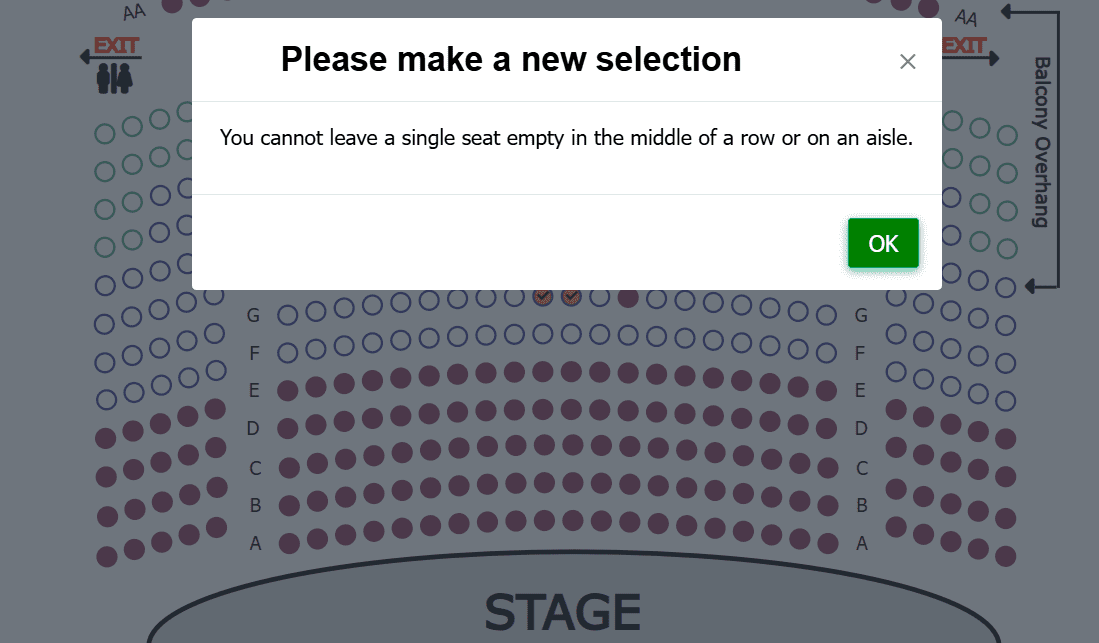
No more orphan seats
Every once in a while a patron prefers a little elbow room and leaves an empty seat between themselves and the next person. For sold-out shows, those stranded single tickets, the lone orphan seats in the middle of a row, are nearly impossible to resell. ThunderTix prevents them automatically, with rules you tune per chart and per performance.
- Three prevention levels per chart
- Per-performance overrides
- Applies to public buyers only
- Box office keeps full control
Pick the right strictness for each chart
Under Seating Charts, the Single Seat column offers three distinct options for orphan seat prevention. Each row below shows the same seats: taken seats in red, the buyer's new selection in blue, and what happens to the empty seat left behind.
Strict at inception, open at the finish line
Prevention does its best work early, keeping rows contiguous while inventory is plentiful. But when a performance is nearly sold out, the seats left over are often singles themselves. That's when you flip just that performance to Allow, making the last few seats sellable, while every other date keeps the strict default. Each performance carries its own Singles setting, right in your event list.
Your box office always has the keys
Prevention logic applies to public ticket buyers only. Admins and box office staff can select any seat from the admin portal, so exceptions are always one click away when a patron truly needs one.
Small gaps, real revenue
Single seat prevention is one of the simplest ways to minimize empty seats at a reserved seating event: it works silently during every online sale, no staff effort required.
Minimize empty single seats
A single stranded seat is revenue you almost never recover. Filling the gaps is the cheapest capacity you'll ever add.
Adapt as each date fills
Run strict while rows are filling, then open singles on the performances where only singles remain. The rule follows the inventory, per performance.
Smoother sales flow
Buyers get gentle guardrails instead of confusing errors at checkout, which means fewer abandoned orders and support calls.
Box office control preserved
Staff can seat anyone anywhere from the admin portal. Automation handles the rule, humans handle the exceptions.
Single seat prevention FAQs
It's seating logic that stops online buyers from leaving a lone empty seat between their selection and another sold seat. Stranded singles in the middle of a row are very hard to resell, so preventing them protects sell-through at reserved seating events.
Each seating chart offers three levels, named just as they appear in ThunderTix: Disabled (no prevention logic at all), Allow Aisle (blocks mid-row singles but permits a gap beside an aisle or row end), and No Single Seats (the strictest, leaving no singles anywhere on the chart, including aisles).
Yes. Every performance carries its own Singles setting, so you can override the chart default for one date without touching the rest. The common pattern runs strict-to-open: charts start on Prevent to keep rows contiguous, and when a performance is nearly sold out, that one gets switched to Allow, because the remaining seats are often singles and allowing them is the only way they sell.
A stranded single, sometimes called an orphan seat, is a lone empty seat left between sold seats in a reserved seating row. Because most people buy tickets in pairs or groups, a stranded single is very hard to sell, which is why many ticketing systems apply seating rules that prevent buyers from creating them.
If you're buying tickets and see a message that a single seat cannot be left empty beside an aisle or another reserved seat, the venue has single seat prevention turned on. The fix is simple: slide your selection over so it sits flush against sold seats or a row's end, add the extra seat to your group, or pick a spot where any gap you leave touches an aisle. If you truly need a specific arrangement, the venue's box office can seat you manually.
No. The logic applies only to public ticket buyers. Admins and box office staff can select any seat through the admin portal, so your team can always make an exception when a patron genuinely needs one.
Set the Single Seat option on your seating chart to Allow Aisle or No Single Seats, and buyers simply can't strand a lone empty seat mid-row. Then work the pattern per performance: hold the strict setting while rows are filling, and when a date is nearly sold out, switch that one performance to Allow so the scattered singles that remain can still sell. Your box office can seat exceptions manually at any time.
Start with single seat prevention, which stops buyers from stranding unsellable singles while your rows are filling, then switch nearly sold-out performances to Allow so the remaining single seats can sell too. Beyond seating rules, reserved seating software helps you resell blocked seats in one step, exchange tickets directly from the chart, and give season subscribers first dibs on renewal, so every seat gets a path to being filled.
More butts in seats, fewer gaps
Single seat prevention is built into every ThunderTix seating chart, with rules you control per chart and per event. See it on a demo chart in minutes.