
Switch ticketing systems mid-season without skipping a beat.
Bring your patrons, your order and donation history, your gift cards, your members, and the tickets you already sold. Your CRM is full on launch day, your seats are already marked sold on the chart, and the barcodes in your patrons' inboxes still scan at the door. No waiting for the season to end. No starting from scratch.
Patrons' existing barcodes still scan.
No half-imports to clean up.
Launch with a CRM that already knows your audience
Most new systems start you with an empty database. ThunderTix starts you with everyone who has ever bought a ticket or made a gift, and everything they did.
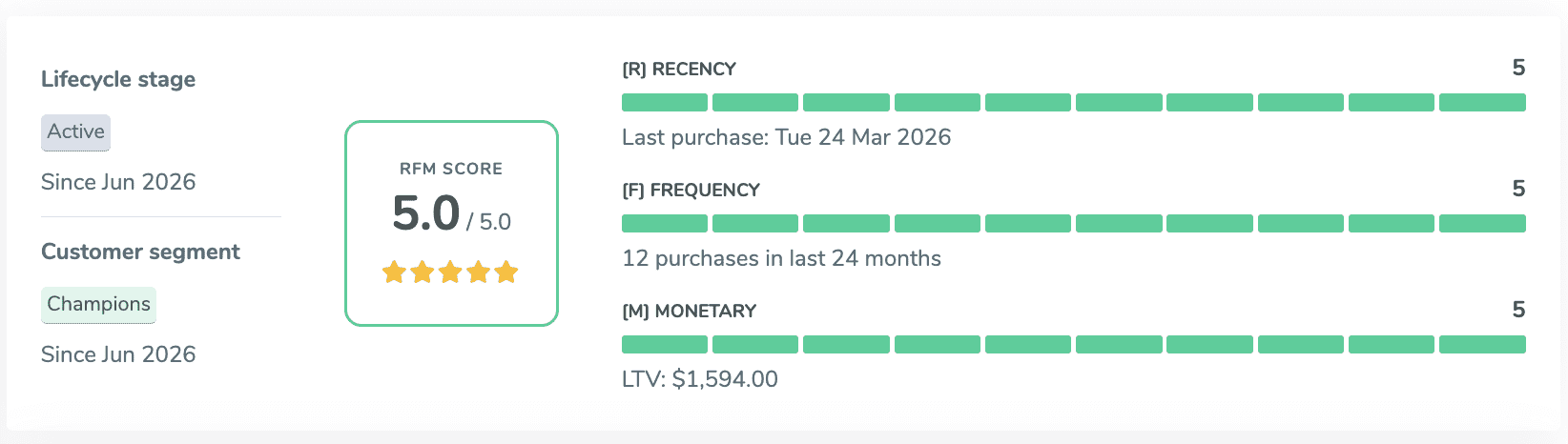
Every patron, with every purchase and gift they ever made.
Start with your patron list: names, emails, phone numbers, addresses, notes, the date they became a customer, and their ID from your old system. Bring your tags along as classifications, like Subscriber, Donor, Volunteer, or Board, with up to 20 per patron.
Then add your order and donation history with the original dates and amounts, going back as many years as your old system kept. Each row attaches to the right patron by email, so on your first day in ThunderTix every profile already shows how long someone has been with you, how often they come, and how much they have given.
Don't spend weeks de-duping your list before you switch. Send it as it is. After the import, the Possible Duplicates report in your patron database flags patrons who share a name, so you can merge or dismiss them in batches. Need to correct a file later? Re-import it, and existing records update in place.
Imported history works like it happened in ThunderTix.
Imported records are not parked in an archive. Search your patron database for everyone who bought in 2019 or gave more than $500 last year, and imported orders and gifts come back right alongside new ones.
Imported donations count toward each patron's giving summary, your donor leaderboard, and your donor levels. Live and imported gifts are added together, so a donor lands in the one level that matches their total giving, ready for your program listing. RFM scores and lifecycle stages are calculated from the full history too, so your first targeted email campaign can go out before your first ThunderTix sale.
Don't wait a season to make the switch
Tickets for the rest of the season are already sold in your old system. Bring them with you. Your shows, your sold seats, and your patrons' barcodes move over, and selling picks up in ThunderTix the same day.
The rest of your season, already sold, already on the chart.
We import your shows, their dates and times, and their ticket types and prices. Then we import every ticket you already sold as a real ThunderTix order, attached to the patron who bought it. For reserved seating, those seats are marked sold on your chart, so the next patron who buys online sees exactly what is left. It works the same for general admission, with your remaining capacity counted down for you.
Because imported tickets are real orders, they show up on your guest lists, at the box office, in your sales reports, and on each patron's profile like any other sale. Shows come in private, so nothing goes on sale publicly until you are ready.
The tickets in your patrons' inboxes still scan.
Patrons who bought before the switch don't need new tickets, and they won't get a surprise email asking them to throw the old ones away. We import the barcodes from your previous system onto their imported tickets, so the ticket they already have is the ticket that gets them in.
At the door, the ThunderTix scanning app checks in both: barcodes issued by your old system and barcodes issued by ThunderTix after the switch, on the same device, in the same line. Your front-of-house team learns one app, and nobody's ticket gets turned away.
Every barcode is matched to the right show, ticket, and seat before anything changes, and every code must be unique. If a single row doesn't line up, nothing is written and you get a row-by-row list of what to fix.
Balances and benefits come with them.
Outstanding gift cards move over with their original card codes, remaining balances, purchaser and recipient details, and original purchase dates. A patron holding a card from your old system types the same code at checkout and spends the same balance. Your gift card reports show each card under the date it was really sold.
Members keep their status too. Active and expired memberships come in with the member's level, start and expiration dates, status, and amount paid, so renewals and member benefits pick up right where they left off.
Our team runs the import with you
You send the exports. We check them, load them in the right order, and confirm the counts before you go live.
Export from your old system
Pull spreadsheet exports of your patrons, history, gift cards, members, and upcoming sales. We give you a template for each one. No need to clean up duplicates first.
We check every file
Each file is validated before anything is written. If a row has a problem, you get a list of exactly which rows and why.
We load it in order
Patrons and history first, then gift cards and members, then your shows, sold tickets, and barcodes, each one building on the last.
Nine kinds of data, ready to use the day you switch
Patrons
Names, emails, phones, addresses, notes, customer-since dates, and previous system IDs.
Classifications
Subscriber, Donor, Volunteer, Board, and any other tags, up to 20 per patron.
Donation history
Counted in giving summaries, the donor leaderboard, and donor levels alongside new gifts.
Gift cards
Original codes, remaining balances, and original purchase dates. Redeemable immediately.
Memberships
Level, start and expiration dates, status, and amount paid for active and past members.
Shows & dates
Events, performances, and ticket types with prices, private until you publish.
Sold tickets
Real ThunderTix orders, linked to each buyer, with reserved seats marked sold on the chart.
Barcodes
Previous-system scan codes on imported tickets, accepted by the ThunderTix scanning app.
Switch when it's right for you, not when the season ends
If your current system is costing you money or patience, you don't have to live with it until summer. Bring your data, keep your patrons' tickets working, and use your full CRM, email marketing, and fundraising tools from the first day.
Talk through your switchData import and migration FAQ
Do we have to wait until the end of our season to switch?
No. We import the tickets you already sold for the rest of the season as real ThunderTix orders, with reserved seats marked sold on your chart and your previous barcodes kept on each ticket. You can switch mid-season and keep selling the same day.
Will patrons who already bought tickets need new ones?
No. When your previous system provides its barcodes, we import them onto each patron's ticket. The ticket they already have scans in the ThunderTix app at the door, right alongside tickets sold in ThunderTix after the switch.
Can we search imported orders and donations?
Yes. Imported orders and donations are included when you search your patron database by purchase or donation date and amount. Imported gifts also count toward giving summaries, the donor leaderboard, and donor levels, and RFM scores and lifecycle stages are calculated from the full history.
Do gift cards keep their original codes?
Yes. Gift cards are imported with their original codes, remaining balances, purchaser and recipient details, and original purchase dates. Patrons redeem them at checkout with the same code from the first day.
Which ticketing systems can you import from?
If your current system can export your data to a spreadsheet, we can work with it. We provide a template for each kind of import and help you map your old system's columns to it.
Do we need to remove duplicate patrons before importing?
No. Send your patron list as it is. After the import, the Possible Duplicates report in your CRM lists every set of patrons who share a first and last name. Merge the records that belong to the same person, several sets at a time, and their orders, donations, tickets, and notes combine into one record. Dismiss any that are different people. We recommend merging once all of your imports are complete, so every order and gift has already found its patron.
Who runs the import?
Our team does. You send your files in a support request, we review them, run each import, and confirm the results with you, including record counts and gift card totals.
What happens if a file has errors?
Nothing is imported until the whole file checks out. If any row has a problem, no records are written and you receive a row-by-row list of what needs fixing, so you never end up with a partial import to untangle.
Do recurring donations transfer?
Your donors' giving history transfers, so every past gift is on their profile and counts toward their totals. Recurring payment agreements can't be moved from another system, so recurring donors set up their recurring gift again in ThunderTix.
Explore more ThunderTix features
CRM & patron data
Where your imported patrons, orders, and gifts live and work.
See the CRM »Reserved seating
The interactive chart your sold seats are imported onto.
See reserved seating »Barcode scanning
One app at the door for old and new barcodes.
See barcode scanning »Gift cards
Imported balances redeem alongside cards you sell in ThunderTix.
See gift cards »Memberships
Members keep their level and dates through the switch.
See memberships »Donations & fundraising
Imported giving counts toward every donor's total.
Explore fundraising »Bring everything. Start selling.
Tell us what system you're on and when you'd like to switch. We'll walk you through what comes over and how long it takes.