
Built for the arts.
Designed for this decade.
Arts People (now part of Neon One) and ThunderTix both serve performing-arts venues, theatres, and nonprofits. The difference shows up in the details patrons feel first — starting with the seat map.
Same audience. Different decade of software.Seat selection your patrons can easily use
A seat map is the one screen every buyer touches. The two platforms draw the room very differently — here are the same kinds of venues, side by side.
A seat map shaped like your actual room
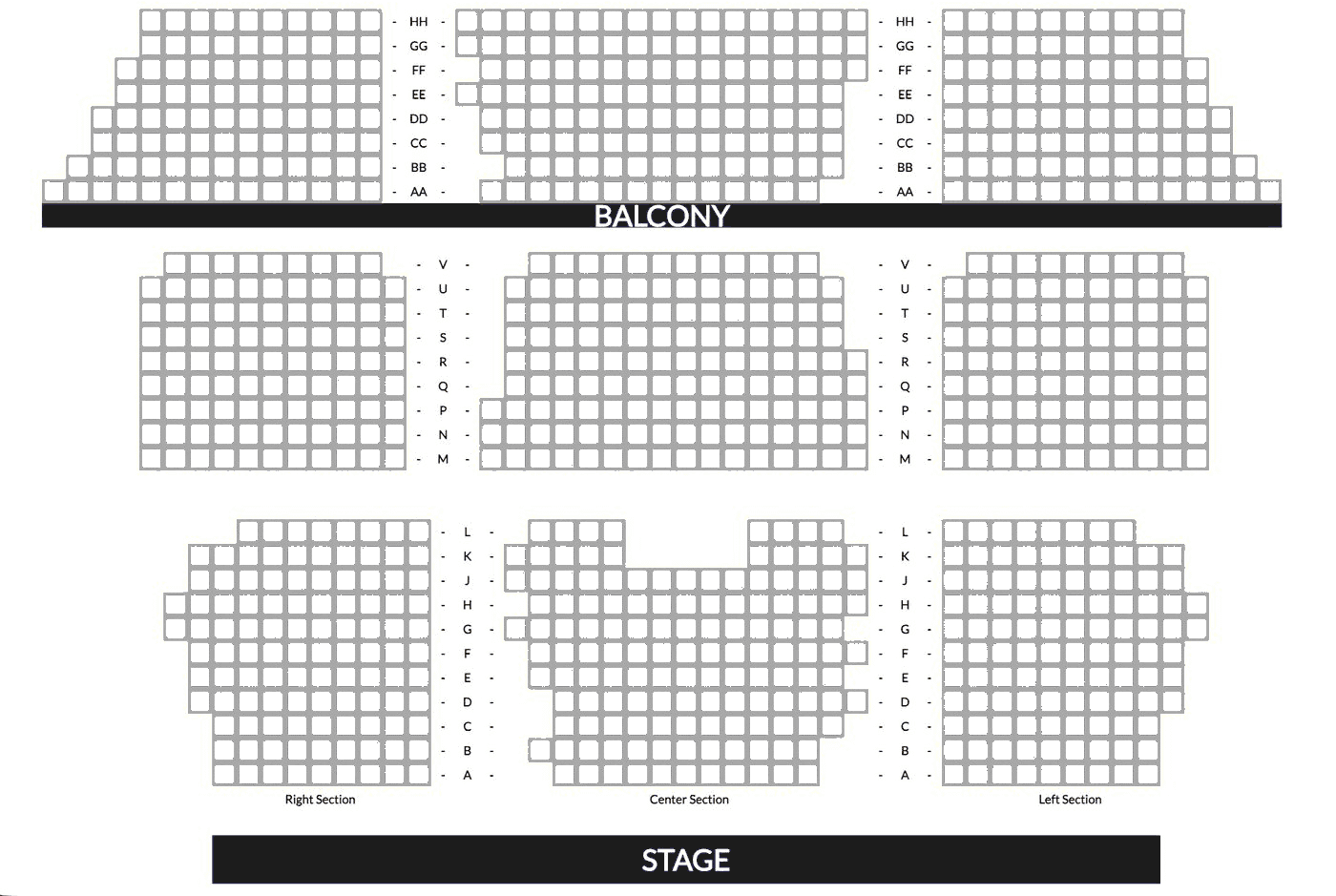
Arts People builds charts on a rectangular grid, so rows and sections sit in straight blocks. ThunderTix draws the auditorium closer to its real shape — fanned arcs, raked rows, angled banks, and a balcony tier above. The two maps below are the same kind of venue.
A rectangular grid layout.

Curved, raked sections that mirror the real auditorium.
Seat holds the public doesn’t need to see
Venues hold seats for all kinds of reasons — staff, cast & crew, ushers, press, accessibility companions. On some platforms those holds are visible to patrons, who can see which seats are held and how many, so a lightly-sold or heavily-held show can look troubled before it starts. With ThunderTix, held seats look identical to sold ones on the public map — no hold type, no count, no operational detail on a public page.
Dinner seating that looks like the room
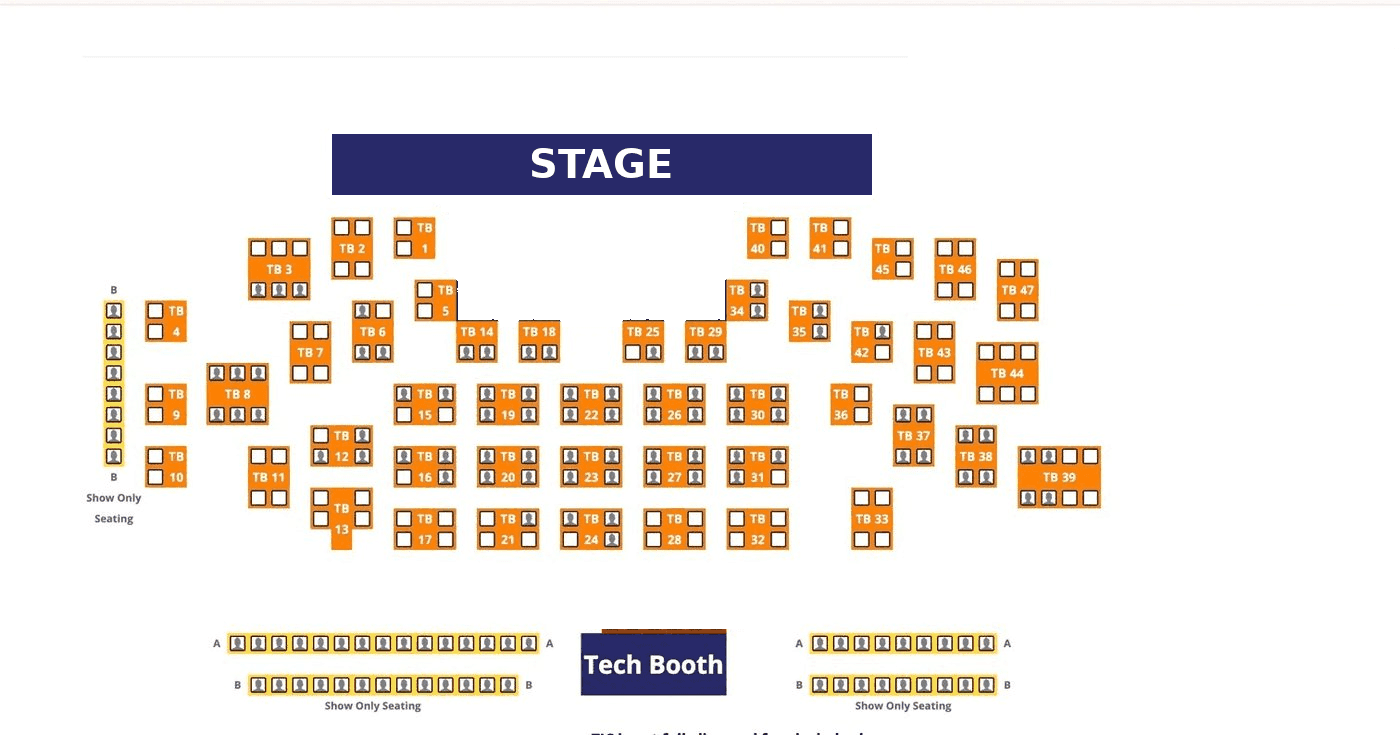
For dinner theatre and cabaret, Arts People represents each table as a shaded box. ThunderTix draws the real floor plan — two-tops, four-tops, long communal tables, and rail seating along the sides — with each seat individually selectable, so guests pick the chair they want and the screen looks like the room they’ll sit in. Venues can also decide, section by section, whether guests may book a single seat at a table or must take the whole table — a simple control that nudges a couple toward a two-top instead of claiming a four-top and leaving two seats empty.
Tables are represented as shaded boxes.
Tables in every size, from two-tops to long communal tables — each seat individually selectable.
The price patrons will actually pay
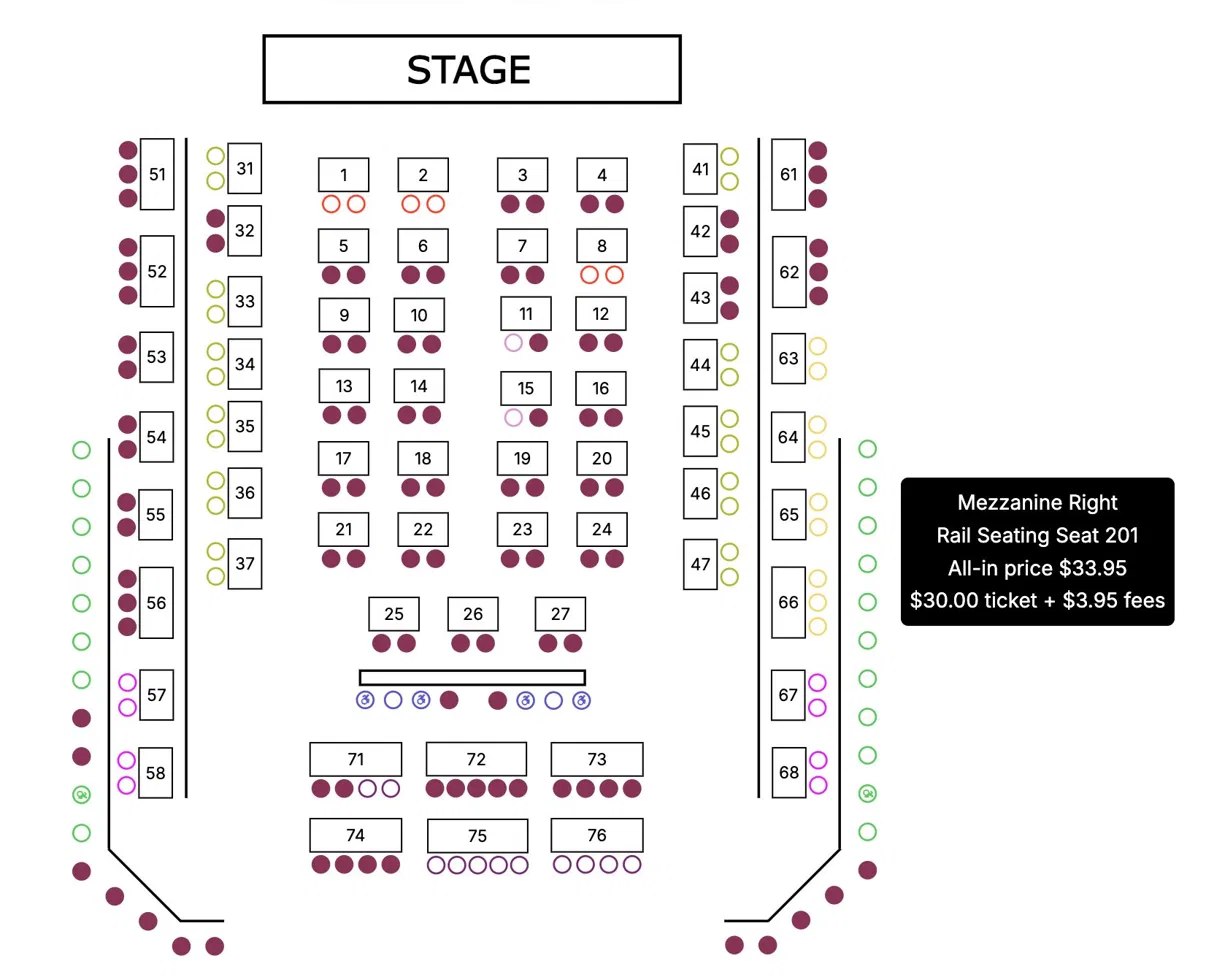
On Arts People, hovering a seat shows only the seat name — nothing about what the patron will actually pay for it. ThunderTix shows the all-in price and the ticket-plus-fees breakdown right on the seat: the kind of up-front, total-price disclosure now required of live-event ticketing under the FTC’s Junk Fees Rule and state laws like California’s SB 478 — with no exemption for nonprofits or small venues.
General admission, priced up front
Not every show has reserved seats — but the “choose your tickets” screen still has to answer the questions every buyer has: what does it cost, and what am I actually getting?
Tell people what they’re buying — and what it costs
ThunderTix shows each option with its all-in price and the exact ticket-plus-fees breakdown, a plain-language description of the seat, and live availability — “Sold Out,” “Only 2 left.” Arts People asks “how many seats?” across five payer types with a quantity box for each, and shows no price anywhere on the screen. One page sells the room; the other asks patrons to guess.

Five ticket types, each with a quantity box, and no prices shown.
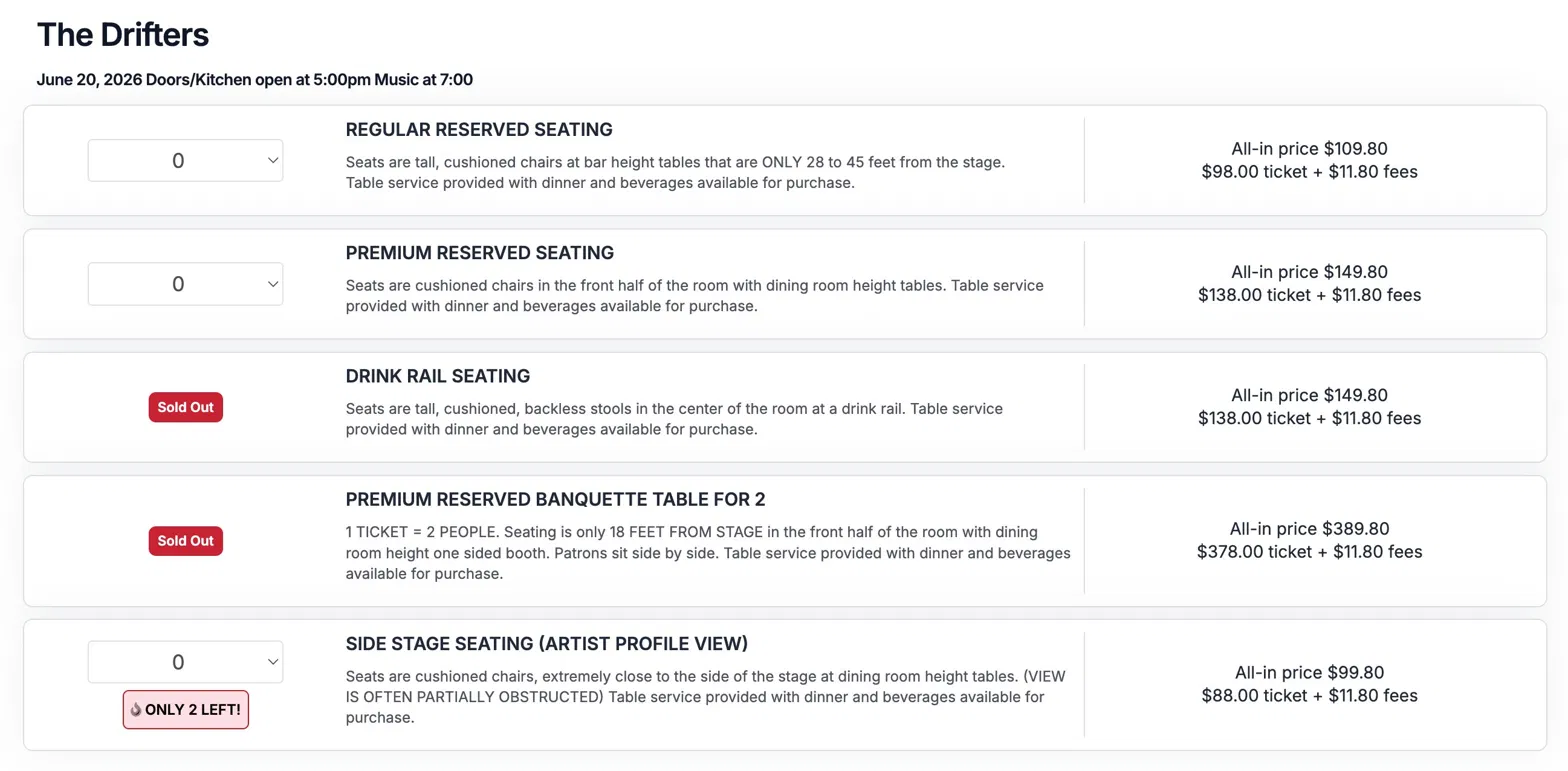
Every option priced all-in, described plainly, with live availability.
Reports that reconcile
Your treasurer, your board, and your auditor all need numbers that tie out. ThunderTix gives you accounting (GL) codes, a reconciliation report, deferred-revenue handling for packages and flex passes, and a cash-vs-accrual view — one system, one source of truth.
Several Arts People reviewers describe the opposite experience: reports that “generate misleading numbers because of the separation between Neon One and Arts People,” along with transactions that aren’t easy to edit and duplicate patron records. Two systems stitched together can be harder to reconcile.
GL Reconciliation — sample
| 4000Ticket Revenue | $48,210.00 |
| 4100Donations | $6,940.00 |
| 2300Deferred (Season) | $12,500.00 |
| 5050Processing Fees | ($1,486.20) |
| Net to deposit | $66,163.80 |
Own your payments
Arts People runs your payments through its own Neon Pay processor. ThunderTix lets you keep your own gateway, be the merchant of record, and decide how fees are handled — your money, your rules.
You’re the merchant of record
With ThunderTix you connect your own Stripe, Square, Authorize.net, or other gateway. Money lands in your bank on your schedule, you choose whether to absorb or pass fees, and there’s no second platform re-pricing or skimming your transactions.
Free and comped tickets are always free — no per-ticket charge on a $0 ticket or a box-office comp.
Payments — on your terms
- Your own gateway — Stripe, Square, Authorize.net, Beanstream, Moneris, or Elavon
- You’re the merchant of record — not a sub-account on someone else’s processor
- Funds settle to your bank on your schedule
- Absorb or pass fees — your call
- Free & comped tickets never carry a per-ticket charge
Patron intelligence, built in
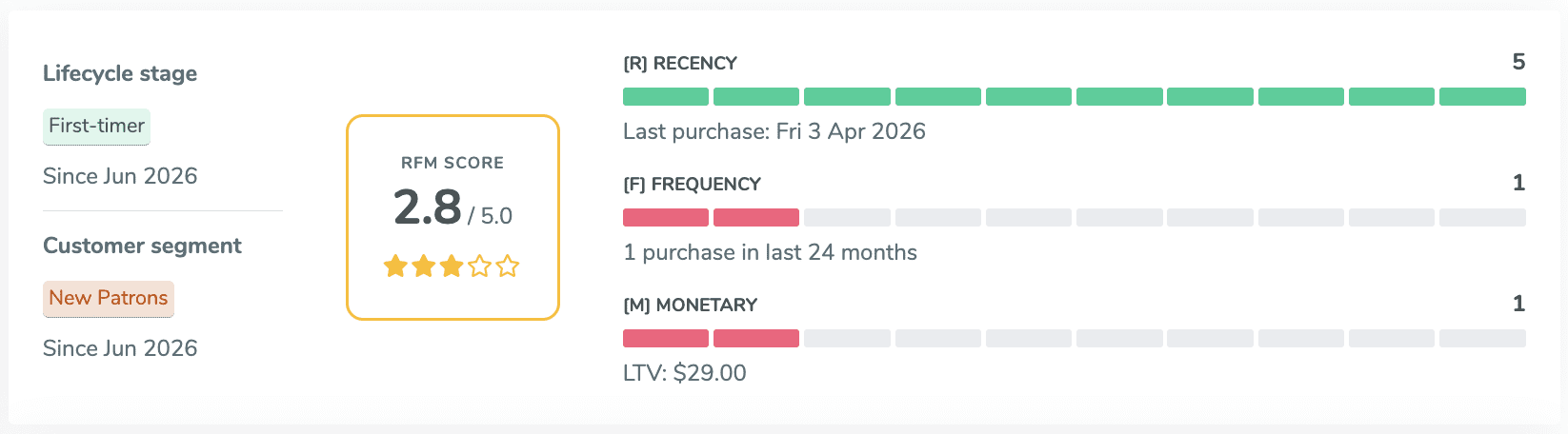
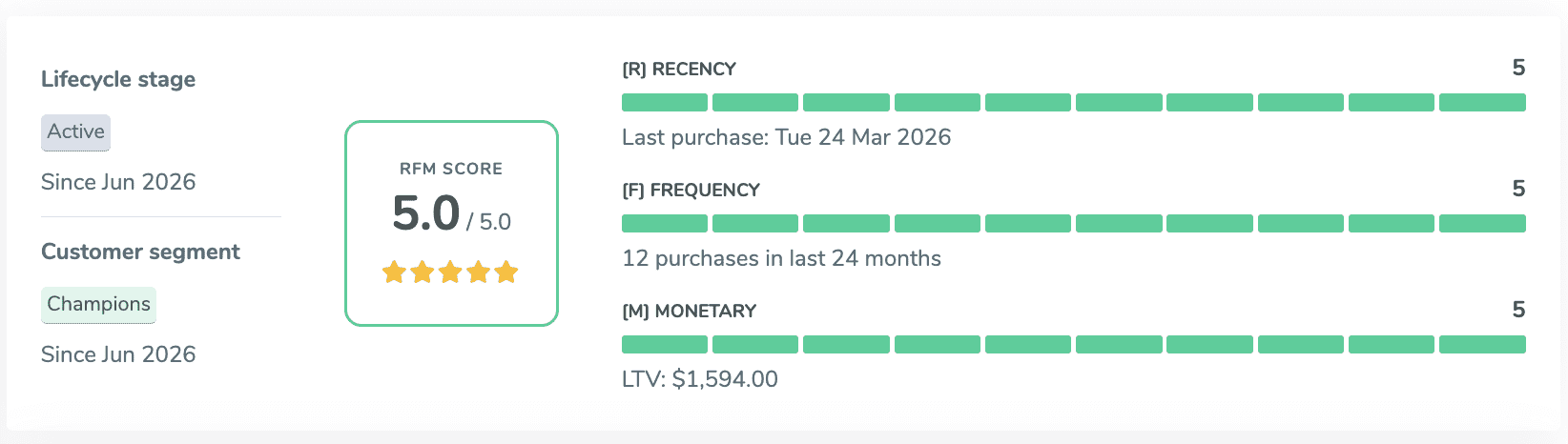
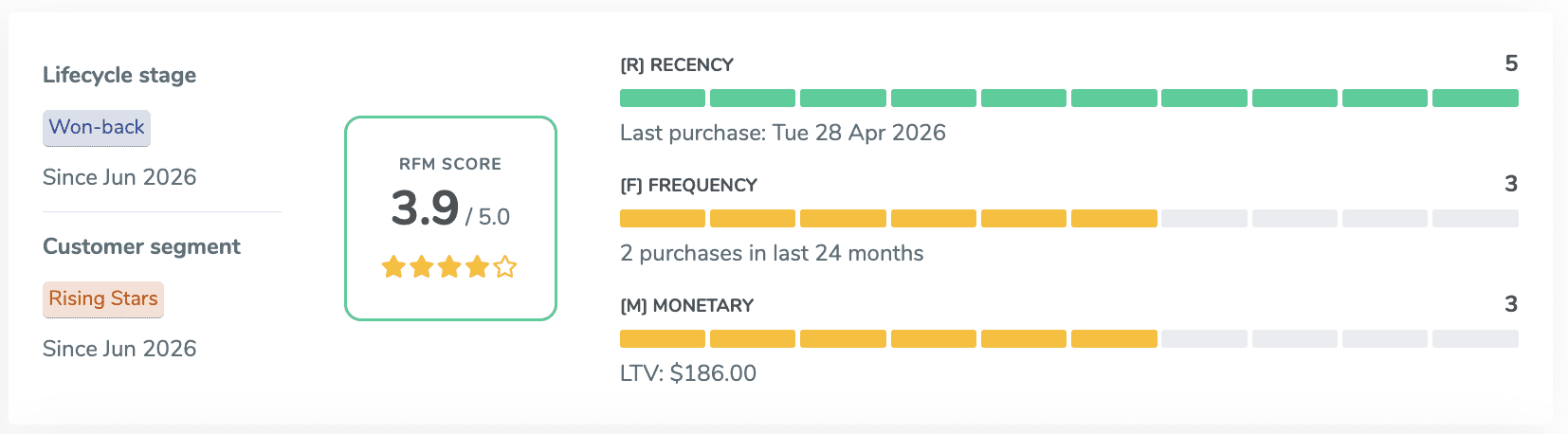
ThunderTix scores every patron automatically — RFM (recency, frequency, monetary) plus eight lifecycle stages from first-timer to won-back — and the full CRM, with search and segmentation, is included in your monthly subscription. Arts People includes basic native patron tools, but its extensive CRM is a separate product — Neon CRM — billed on top of ticketing, starting at $99/month. With ThunderTix the database segments patrons for you the moment a ticket sells, at no added cost.
Because it’s the same system that sold the ticket, there’s no second database to reconcile to find your best patrons — and a full export/API keeps that data genuinely yours.
Patron lifecycle · live RFM
An assistant that already knows your box office
ThunderTix ships an AI support assistant trained on your own ticketing data — so patrons and staff get answers in seconds, not a support queue. It’s the kind of capability legacy platforms describe as a roadmap item, available now.
It goes further than a chat box: ThunderTix also offers an MCP connector (in beta, included free) that lets AI agents and assistants work directly with your box office — pulling reports, checking availability, drafting patron outreach — all under your control.
ThunderTix vs Arts People, at a glance
The functional differences that matter most for a working box office.
| ThunderTix | Arts People | |
|---|---|---|
| Seat-map geometry | ✓Curves, arcs, angled & raked sections, real tables | Rectangular grid builder only |
| Self-service event setup | ✓Create and edit events yourself — on sale in minutes | Setup and changes often run through their support team |
| Held seats | ✓Hidden from patrons — shown only as unavailable | Marked “Held” on the public map |
| Prices before checkout | ✓All-in price, fees & description on every option | Quantity form, no prices shown |
| Payments & gateway | ✓Your own gateway, you’re the merchant of record | Processed through Neon Pay |
| Reporting | ✓One system: GL codes, reconciliation, deferred revenue | Split across Arts People + Neon CRM |
| Patron segmentation | ✓Automatic RFM & lifecycle staging, included | Manual list-building |
| Full CRM & search | ✓Included in your subscription | Separate Neon CRM subscription |
| AI & automation | ✓Built-in AI assistant + MCP connector | Not available |
| Mass email | ✓Included — keeps your sent history | Included, but doesn’t retain sent emails |
When Arts People may be the better fit
If your organization already lives inside the Neon One ecosystem — Neon CRM for fundraising, memberships, and grants — and ticketing is a secondary function, Arts People’s native tie-in to that stack is a real advantage. And for very small, low-volume groups that want the simplest possible per-ticket price with no platform fee, a flat $0.99 model can pencil out. ThunderTix is built for venues where the box office itself is the engine: where seating, reporting, and patron data carry the weight.
No metered add-ons
The embed widget, mass email, and Classes module are included — not billed per ticket as separate line items.
One system, one ledger
Tickets, donations, packages, and patron history live together, so your reports actually reconcile.
Free means free
No per-ticket charge on $0 tickets or box-office comps. You only pay when you sell.
See the difference on the screen that matters
Take ThunderTix for a spin — start with the seat map your patrons will actually use, then look at the reports your board will trust.
View pricing & start free