
ThunderTix's commission tracking feature makes managing an incentive program for your sales agents a breeze. Not only will you be able to track sales based on the event and ticket types sold, you will also have the ability to create users with access to sell tickets at predetermined discount prices. (example: A hotel concierge sells tickets at $5.00 below the public price.)
Tracking Sales & Commissions
Sales incentive groups - Create time-saving groups to track agent commissions. You can also create discount groups to apply special ticket prices en masse. Commission tracking works very well with the ThunderTix outlet tracking feature.
Handle cash transactions - In addition to all credit card sales, you can track cash transactions at the box office or off-site - a hassle free way to keep track of balances owed by your sales agents.
Track & record paid commissions - Built upon our robust sales reporting technology, ThunderTix helps you identify the funds collected and the commissions earned per agent or by group. Transactions can be filtered by user, date range, ticket type, and event name.
When comparing ticketing software, make sure you are given control over ticket fees. Sales agent commissions are more complicated to track if the ticketing software is charging you a mandatory fee for every ticket sold. ThunderTix does not charge any per-ticket fees; Instead, we give you the control to decide what fees to charge and how they are presented during the ticket purchase process.
Create Sales Incentive Groups
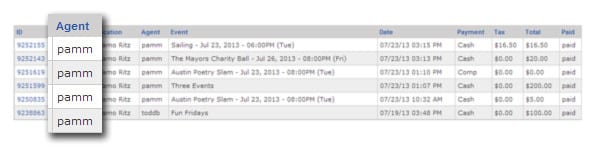
If you have one venue or one-hundred, five sales agents or five-hundred, the ThunderTix commission tracking feature scales to meet your needs. Commission tracking can be by individual agent or groups, here's how it works...
Commission Group - Manage commissioned sales agents by tracking their sales based on the events sold and the corresponding ticket levels sold (i.e. Adult, Senior, Child). Users belonging to this group are assigned a predetermined commission structure which is applied every time a ticket is sold.
Discount Group - Users belonging to this group are able to sell tickets at a predetermined discount based on the event and ticket level sold. You can assign in-house sales agents or remote third parties to a discount group to give them the incentive to sell.
Commission and discount structures are controlled by the administrator of the account, and can be edited at any time. ThunderTix makes it easy to select individual users within your account and assign them to any of the active incentive groups.
Incentive groups are integrated with the ThunderTix outlet tracking feature. The ThunderTix outlet tracking feature requires sales agents to select the current location they are selling tickets from that day, before allowing any orders to be processed. Our sales outlet location tracking module will allow you to identify which sales outlets are most productive and which need improvement.
Handle Cash Transactions

In situations where your sales agents are handling cash, it is important to keep an accurate count of ticket sales and the balance of cash due to your venue. ThunderTix provides you with a hassle-free way to keep track of balances owed by your sales agents.
- Negative Balances represent the money owed to the venue by the sales agent.
- View a balance report by user agent and/or date range.
- Record user agents' payments and cash received transactions
- Search for transactions within a specific date range
It is important to note that a ThunderTix account functions as both an online ticket outlet as well as making any computer in the box office a Point of Sales (PoS) device. With so many transactions from credit card and cash sales - at multiple outlets - you'll need an end-to-end solution to manage them securely. To learn more about our complete box office management solution, of which the commission tracking feature is just one part of, contact us to schedule a demonstration.
Track and Record Paid Commissions
Trying to keep track of multiple sales agents and their commissions can become a logistical nightmare, especially when cash is involved. ThunderTix allows you to easily identify the cash collected and the commissions earned. Transactions can be be filtered by user, date range, ticket type, and event name.
Agent commission reports are built using the same industry leading technology that powers ThunderTix sales order and customer reports. As you sell tickets, the ThunderTix sales reports are available for you to customize and make use of to gain genuine insight to your business and your sales agents. You can generate any ThunderTix report as frequently as you need them (daily, weekly, quarterly) and specify the types of sales data (single event, multiple events, by agent, outlet or customer) that best serve your business goals.
Sales Agent Commission Tracking
Use our commissions tracking feature in combination with our sales outlet location tracking and custom reporting for total business intelligence. This suite of tools can be used monitor ticket sales velocities, the most productive agents, total and individual event sales, all from a your ThunderTix account. Be sure to take a look at all the features we have to offer and sign up for a free trial today!